#1403 User in user group does not see a metamodel that is integrated as a child of tl_member (state: open)
- Assigned to
-

-
May 6, 2020 16:42
Checklist before I submit this issue report
I confirm that:
- I have tested this with the latest version available
- I have read documentation @ http://metamodels.readthedocs.org/en/ or http://metamodels.readthedocs.org/de/
- I have checked the Contao community forums for references https://community.contao.org/
- I have checked existing issues for duplicates and found none @ https://github.com/MetaModels/core/issues?q=is%3Aissue
My environment is:
(Please fill in the actual values from your environment - check Contao Manager or use
composer show)Key Value Comments PHP version: 7.3.11 Contao version: 4.4.46 MetaModels version: 2.1.7 Installed MetaModels packages: MetaModels Bundle-All, Frontend-Editing DCG version: 2.1.5 Issue description
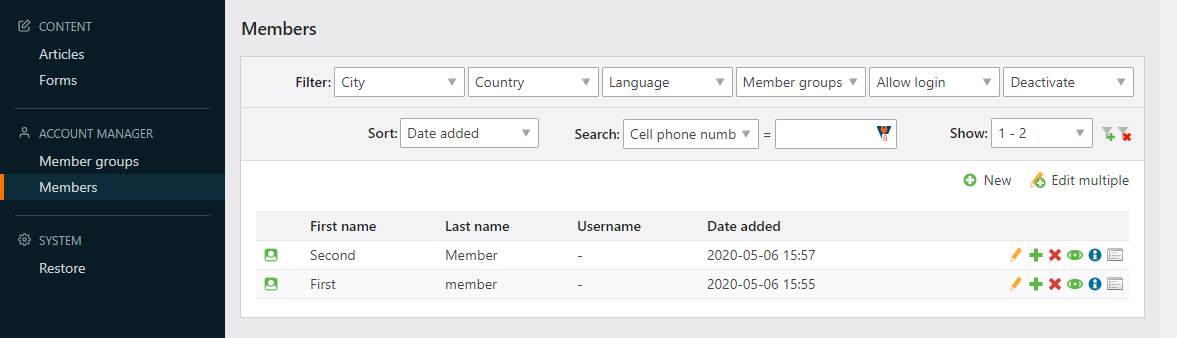
I have a metamodel that is integrated as a child table of tl_member. As an administrator I have an Icon in Member List View which show me the MM-List with pid as tl_member user id.
I set up a user group given rights to Member and all allowed (single) fields checked. I then set up the user group in input/output configuration (MM) and give him a Backend group and in input screen. But the icon in Member List view is not shown.
-- | --
Steps to reproduce
see above
Describe the behaviour of the application
see above
Describe the expected behaviour of the application
I would have expected the last icon for the MM to show up in the member list. It works for an admin user but not for a restricted user.
Screenshots
(Add some visual love or even a video if you can)
-
May 6, 2020 16:45
@baumannsven relatet with https://github.com/contao-community-alliance/dc-general/issues/498 ?
-
May 6, 2020 18:02
but it works in MM 2.2 https://easycaptures.com/fs/uploaded/1327/9697127351.png
-
May 6, 2020 18:18
Mea maxima culpa MM Core was 2.1.7 and not the newest 2.1-version. It works with 2.1.9!!
-
May 6, 2020 18:51
This was not primarily due to the update - by deleting the cache, the icons were then also visible to the editors.
The phenomenon should be observed and further investigated if necessary.